The correction loop
Someone spots a wrong answer. In dst it ends as a fix in your files plus a test that proves the mistake stays fixed.
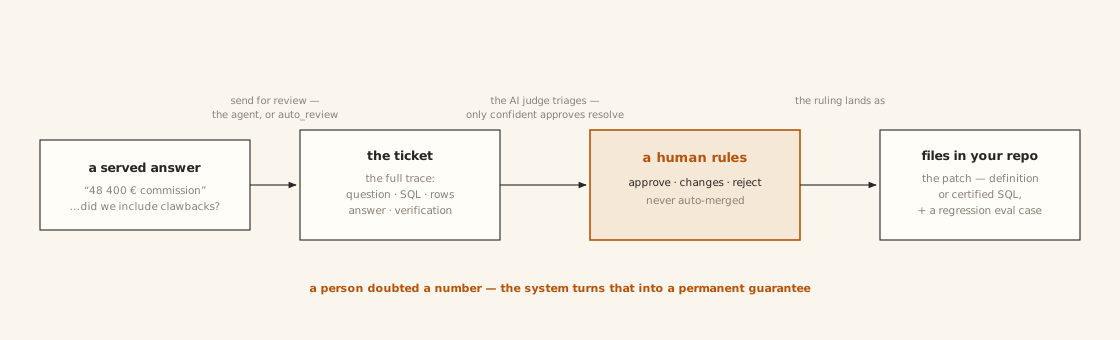
The loop has four steps, and a person is in the middle of it:
- Someone doubts an answer. They flag it — or dst flags it itself.
- dst opens a ticket with everything needed to judge the answer: the question, the SQL, the rows, the answer, and how it was verified.
- An AI does the paperwork, a person decides. The AI compares, triages, and drafts a fix. A human approves or rejects it. Nothing is ever applied without a person's approval.
- The fix becomes a file and a test. The file goes in your repo like any other change. The test re-runs every time you publish, so the same mistake cannot quietly come back.
The rest of this page is those four steps in detail.
A wrong answer becomes a ticket
Two ways a ticket opens:
- A caller flags an answer. Their AI calls the
send_for_reviewtool (orPOST /v1/reviews) with a note, and optionally the SQL they believe is right. Both are recorded as a proposed correction, not just a complaint. - dst flags itself. Set
auto_review: unverified(orpartial, which covers both) inlens.yamland low-confidence answers open tickets on their own. The queue watches the lens, not just its callers.
What lands in the ticket is the whole story — question, SQL, answer, row count, verification report — so the reviewer judges the answer, not a summary of it.
If a very similar question has already been certified, its known-good SQL is attached for comparison, and an AI judge takes a first pass: an answer the judge explicitly approves is closed automatically, and everything else goes to a human — every other verdict, and every unparseable or empty reply. (With no AI model configured, everything goes to a human, full stop; with no embedding provider, no certified SQL is attached to compare against.)
People rule from the dashboard or the terminal:
dst rule <ticket> --verdict approve|changes|reject [--certify]
--certify does two things in one move: files the ruling and saves the
question with the SQL that was served as a
certified answer — an answer dst will from now on
serve exactly as approved, and test on every publish. It snapshots the traced
request, not the correction's proposed SQL, so use it when the served SQL was
right; take a corrected query through the patch path below instead.

A ruling becomes a fix in your files
Once a ticket is ruled on, the AI drafts the actual fix — say, an amended definition. The AI drafts; the human approves; there is no auto-merge.
Where the fix lands depends on what kind of fix it is:
- A certified answer is server-side state: on approval it takes effect immediately.
- A definition or instruction lives in your files, and your files win on
every
dst apply. So approval writes a proposed file into your working tree — you review it like any code change (git diff), commit it, and apply. Until then it is not live. (If dst wrote it straight into the server instead, your next apply of the unchanged files would silently undo the fix. That is why it goes through your repo.)
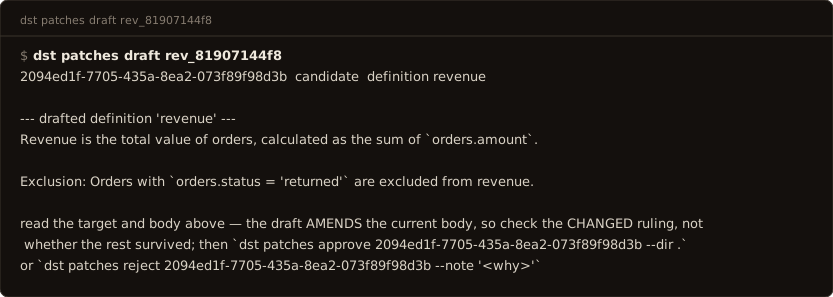

A definition or instruction fix also becomes a behavioral test case —
marked candidate until a person promotes it (status: approved in
evals/cases.yaml), because a human approved the fix and a human approves the
test too. Once promoted, it re-runs on every dst apply. A certified fix
needs no case: the certified corpus already re-tests it.
After the fix lands
The corrected question is served from its approved SQL from then on — the same answer every time, cheaper and faster than generating it again. And because every fix carries a test that re-runs on every publish, a mistake you have caught cannot ship again unnoticed.
Tickets are not the only thing that feeds this loop. dst can also mine the request log for recurring questions worth turning into definitions — an admin-triggered pass, not a standing one — and bootstrapping from history seeds your definitions before the loop even starts. Everything goes through the same discipline: a draft, a human approval, a file.