Deploying
dst deploys as one stateless container (API + dashboard, same origin)
against one Postgres with pgvector that you provide. All state lives in
Postgres: lenses, curated context, certified answers, credentials (encrypted), traces;
the container keeps no state on disk (it wants a writable /tmp for Python scratch,
and a local-embed build caches model weights under $HOME). So the whole deployment
statement is:
pinned image tag + database URLs +
DST_SECRET_KEY+DST_PUBLIC_BASE_URL
Anything that can run that container against that database works: a VM with
compose, Kubernetes with the helm chart, Cloud Run. Images publish to GHCR on
every release tag; pin one, never latest.
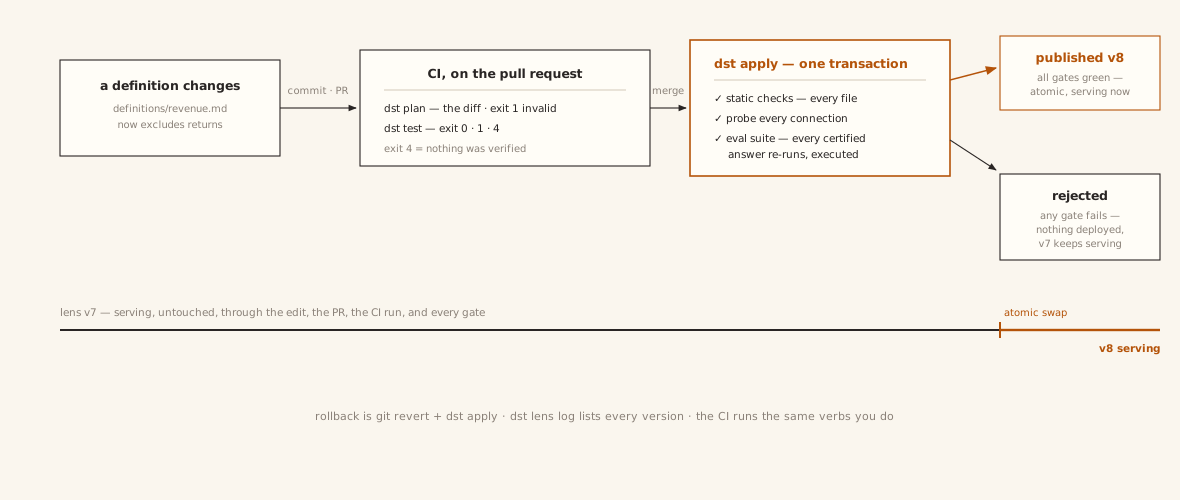
Publishing a change is a CI/CD pipeline, not a console session — and the prior version serves untouched until the atomic swap (Environments and CI is that pipeline, end to end):
The contract
In DST_ENVIRONMENT=production the server fails startup by name on a missing
DST_SECRET_KEY or DST_PUBLIC_BASE_URL — and on the well-known dev database
password — while DSNs without an sslmode get sslmode=require appended unless they
target a unix socket (libpq's default would silently connect unencrypted).
| Env var | Required (prod) | What |
|---|---|---|
DATABASE_URL |
yes | app DSN: the non-superuser dst_app role, so row-level security is enforced. Never a superuser: superusers bypass RLS, which silently disables tenant isolation |
DATABASE_ADMIN_URL |
yes | privileged DSN: dst migrate, and at runtime admin-token auth and OAuth run on the admin engine |
DST_SECRET_KEY |
yes | Fernet key(s) encrypting stored warehouse credentials + OAuth code signing, comma-separated (first encrypts, all decrypt). Generate with dst secret. Losing it orphans every stored credential; to change it, follow the rotation sequence below rather than swapping it. Unset, multi-instance MCP OAuth breaks nondeterministically |
DST_PUBLIC_BASE_URL |
yes | the origin you serve at (https://dst.example.com). OAuth metadata and review links derive from it instead of trusting forwarded Host headers, and the MCP transport allowlists its hostname alongside the localhost forms (any other Host gets a 421) |
DST_ENVIRONMENT |
yes | production switches the contract on (and drops dev localhost CORS origins) |
DST_PROVIDERS |
no | LLM/embedding providers, JSON; see Configuration |
PORT |
no | listen port (default 8000); the container binds 0.0.0.0 |
DST_CORS_ORIGINS |
no | comma-separated extra origins, only for split-origin frontends |
DST_MIGRATE_ON_START |
no | default true: entrypoint waits for the DB and migrates before serving (right for compose). Orchestrated deploys set false and run dst migrate once per release |
DST_DB_POOL_SIZE / DST_DB_MAX_OVERFLOW / DST_DB_POOL_RECYCLE |
no | per-engine pool knobs (defaults 5/10/1800s). Budget instances × 2 engines × (pool_size + max_overflow) under your Postgres max_connections |
Postgres requirements
- pgvector ≥ 0.5.0 (the schema uses HNSW indexes): AWS RDS needs PG
15.5+/16.1+, Cloud SQL PG 15+; Neon and Supabase ship it built in. The
first migration runs
CREATE EXTENSION IF NOT EXISTS vector. - Migrations create the
dst_approle and its grants (0001). Always run migrations as the same admin role:ALTER DEFAULT PRIVILEGESbinds to the role that executed it, so switching admin users mid-history silently drops grants on new tables. dst migrateis idempotent and takes a blocking advisory lock: concurrent runs serialize instead of racing.- Back up before upgrading, like any schema-owning app.
VM: docker compose
deploy/docker-compose.yml
is a supported production path for single-machine deployments, not just a demo:
POSTGRES_PASSWORD=… DST_APP_DB_PASSWORD=… DST_SECRET_KEY=$(dst secret) \
  docker compose -f deploy/docker-compose.yml up -d
All three are required: compose refuses to start without them, and dst migrate
applies DST_APP_DB_PASSWORD to the dst_app role (which ships with no password)
on every start, so changing it here rotates it.
It runs pgvector Postgres + the app with migrate-on-start. The app service builds
from this checkout; to run a published release instead, replace its build: with
image: ghcr.io/get-dst/dst:<tag>. Put a TLS-terminating proxy (Caddy, nginx) in
front, and add DST_PUBLIC_BASE_URL + DST_ENVIRONMENT=production to the app
service's environment: — only the four keys listed there reach the container.
Kubernetes: helm
The chart is deliberately small: one Deployment, a Service, an optional Ingress,
and a pre-install/pre-upgrade Job that runs dst migrate. It never bundles
a database: point it at your managed Postgres.
kubectl create secret generic dst \
  --from-literal=database-url='postgresql+psycopg://dst_app:…@…/dst?sslmode=require' \
  --from-literal=database-admin-url='postgresql+psycopg://admin:…@…/dst?sslmode=require' \
  --from-literal=secret-key="$(dst secret)"

helm install dst oci://ghcr.io/get-dst/charts/dst --version <X.Y.Z> \
  --set publicBaseUrl=https://dst.example.com
Serving pods run with DST_MIGRATE_ON_START=false (migrations belong to
the hook Job) but still carry both DSNs: admin-token auth and
OAuth run on the admin engine. Replicas scale horizontally: pods are
stateless.
Cloud Run and friends
Works, with three settings that matter:
- min-instances = 1, CPU always allocated. Post-response work (warehouse profiling after connection registration) runs in-process; scale-to-zero or CPU throttling silently kills it.
- Migrations as a release step: set
DST_MIGRATE_ON_START=falseand rundst migratein a Cloud Run Job (or your deploy pipeline) per release. - Static egress (Cloud NAT + VPC connector) if customers IP-allowlist their warehouses: Cloud Run's default egress IPs rotate.
Raise the request timeout if you trigger audits or eval suites over HTTP; they run in-request.
Backup & restore
The app container is stateless: the database plus DST_SECRET_KEY are the
entire state. Embeddings, traces, review queues, and
stored credentials all live in Postgres; there is no object store.
Back up two things, always together:
- The database.
pg_dump --format=customof the one dst database (pgvector columns dump and restore like any other type; the restore target needs the extension available, same as Postgres requirements). DST_SECRET_KEY: in your secret manager, not beside the dump. Stored warehouse/context credentials in the dump are Fernet-encrypted with this exact key.
A dump without its key loses every stored credential
Restoring into a deployment with a fresh DST_SECRET_KEY produces an
install whose stored warehouse and context credentials are permanently
undecryptable. Restore with the original key, or plan to re-enter every
credential. This no longer fails silently: the server checks the key against
an encrypted sentinel row at startup and refuses to boot on a mismatch, so it
is a failed deploy rather than a 503 on whichever connector is touched first.
Rotating the key on a live deployment is supported. DST_SECRET_KEY takes
a comma-separated list (the first key encrypts, all of them decrypt):
- Deploy with
DST_SECRET_KEY=<new>,<old>. Everything still decrypts. - Run
dst rotate-key. It re-encrypts every stored secret under<new>, names any row it could not decrypt, and exits non-zero if any failed. - Once it exits 0, drop
<old>.
Do not skip step 2, and do not drop the old key while step 2 is failing.
Restore = create the database, pg_restore, start the same pinned image tag
with the same key, and let dst migrate no-op as the version check.
Upgrades
- Back up Postgres (above).
- Bump the pinned image tag (and chart version; they move together).
- Run
dst migrate(the compose entrypoint and helm hook do it for you).
Rate limiting is per-instance; at replicas > 1 treat limits as approximate.
Liveness is /health; /ready additionally exercises the database and the MCP
transport; point readiness probes at it with a generous period.