Lenses
A lens is one use case, packaged: a job people need answers for — commission questions, churn questions, the board's monthly numbers. Each lens declares the three things that job needs:
- A set of data: which business objects are in scope (deals, payouts, customers). Each object already knows which warehouse and tables it comes from.
- A set of context: what the words mean here — your definitions, including the contested ones — plus anything else needed to read the data correctly.
- A set of callers: who may ask. Access starts fully closed; no caller key
reaches a lens until you allow it (org admins are the exception — a lens
with no callers is admin-only, and
dst applysays so). Keys belong to people, not tools.
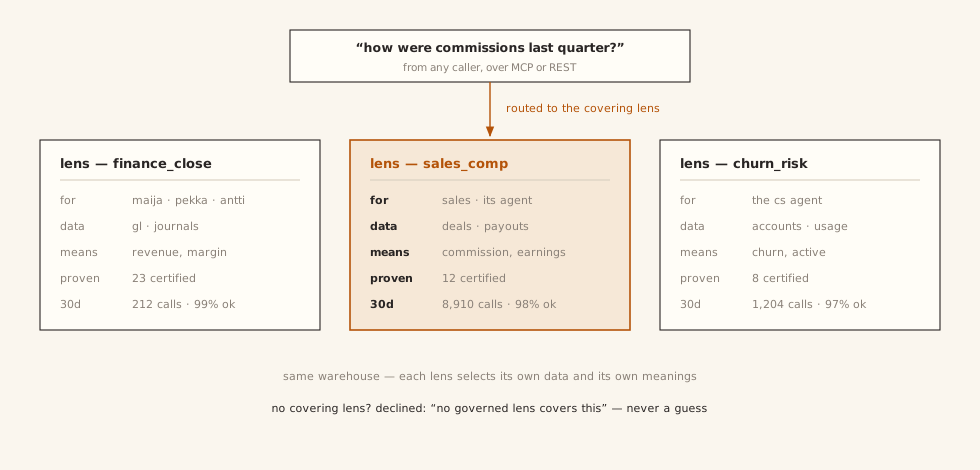
Under the hood, a lens is a selection: it picks which entities, definitions,
and approved answers it may use from the shared pool, and binds them to a
warehouse connection and an access list. When a question comes in, the lens
decides what the answer may touch and what the words in the question mean.
Lenses are named for use cases (sales_comp), never for tables.
A lens also says, in plain words, what it is for. The use_when lines in
queries.yaml state its purpose, and they are the lens's most direct lever on
routing when the caller didn't name a lens — dst builds the lens's routing
profile from them together with everything else the lens selected (its terms,
entity and metric names, sample queries, use cases). A lens with no use_when
is a lens that hasn't said what it is for. The lens description is
deliberately kept out of the scored anchors — it matches almost any question
and would over-route — but a shortlisted lens shows it to the decider
alongside them.
One metric, one definition — the word is what varies
You should not give two teams two different "revenue" metrics. Metrics are defined once, in the shared files, each one clearly itself: bookings is bookings, recognized revenue is recognized revenue. What varies is which of them the word "revenue" points to when a particular person says it: sales says revenue and means bookings; finance says revenue and means recognized revenue. Both are legitimate. The word is just doing double duty.
At that fork, dst's job is to not guess. Mark the term ambiguous, list its
possible meanings, and a question that uses it comes back as a question —
"which do you mean?" — before anything runs. Often a lens's own scope settles
it (a commission lens has only one revenue-like metric in play). When one word
is claimed by several metrics and nothing settles it, dst apply warns you by
name: govern the others, or mark the term ambiguous.
Selection, not copy
lens.yaml names what the lens takes from the shared files, and dst apply
compiles that selection into what the lens actually serves from. A term the
lens selects from the shared files and also defines locally is an error at
apply time — never a silent winner. Metrics the lens didn't select are refused
outright, before any AI model is even called (see
Clarification & refusal) — including answers that
would quietly rebuild an unselected metric from raw columns.
The file layout:
semantic/                     # project scope, shared by every lens
  entities/deals.yaml         # table, grain, use/avoid, fields, metrics
  relationships/deals__reps.yaml  # one join pair per file (left = the FK side)
  definitions/commission.md   # governed term: frontmatter + prose
lenses/sales_comp/
  lens.yaml                   # the selection + policy (below)
  queries.yaml                # use_when + sample queries, lens-local
  definitions/*.md            # lens-LOCAL terms
  certified_answers.yaml      # approved question→SQL pairs
  evals/cases.yaml            # behavioral cases (expect: clarify | refuse)
# lenses/sales_comp/lens.yaml (abridged)
name: sales_comp
connections: [bigquery]
select:
  entities:
    - name: reps
    - name: deals
    - name: payouts
  definitions: [commission, earnings]
access:
  allow: []        # deny-by-default; grant callers or groups explicitly
Versioned like code
Every publish snapshots a numbered version of the lens, and any two versions can be compared as a file diff. You review a lens change the way you review a pull request, because structurally it is one.
It asks; it never silently decides
When a question hinges on a word with more than one governed meaning, the lens does not pick the likelier reading. It returns the question: which meaning do you want? This happens in plain code, before any AI generation — so it happens every time, not just when the model feels unsure.
Clarify
"What is the average value per customer?" value is ambiguous here:
lifetime value (customers.customer_lifetime_value) or order amount
(orders.amount)? The answer is a question, not a guess.
Contested words usually surface through bootstrapping from history — the same metric computed several different ways in your warehouse's own query history — and get recorded as ambiguous definitions rather than silently crowned winners.
One agent, one lens
A lens bundles vocabulary, scope, and access in one object — so the natural
setup for AI agents is one scoped lens per agent, reached over MCP. What
list_lenses returns under the agent's key is its entire world. See
Agents over MCP.